
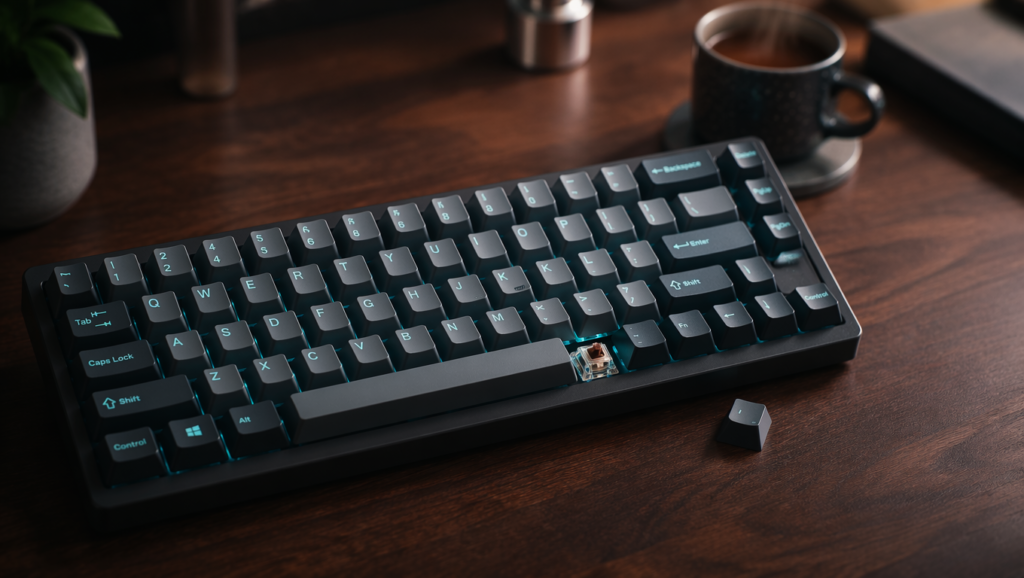
A mechanical keyboard is a type of keyboard that uses individual mechanical switches beneath each key, unlike standard membrane keyboards that use a single rubber sheet. These mechanical switches are physical components that register a keystroke when pressed, providing distinct tactile feedback, audible clicks, and a satisfying typing sensation that many people prefer. This is why millions of users are now searching for the best mechanical keyboard to upgrade their daily computing experience.
Whether you are a programmer typing code for hours, a gamer seeking competitive precision, or a writer looking for comfort, the right mechanical keyboard can transform how you interact with your computer. However, with so many switch types, sizes, and brands available, finding the perfect one can be overwhelming. This guide will walk you through everything you need to know.
What Is a Mechanical Keyboard?
A mechanical keyboard uses individual mechanical switches under each keycap. Each key operates independently with its own spring and stem mechanism. When you press a key, the switch actuates and sends a signal to your computer. This is fundamentally different from a membrane keyboard, where keystrokes are registered by a single rubber dome layer.
The switches come in various types, each with different feel, sound, and actuation force. The most common types are linear (smooth and quiet), tactile (with a noticeable bump), and clicky (loud and crisp). These switches are typically rated for over 50 million keystrokes, making a mechanical keyboard incredibly durable.
Why People Need a Mechanical Keyboard
Many people switch to a mechanical keyboard because they are frustrated with standard keyboards. Here are the main pain points a mechanical keyboard solves:
Typing fatigue is a common issue with membrane keyboards. The mushy feel requires more force and can lead to discomfort during long typing sessions. Mechanical keyboards offer a more responsive feel, reducing the effort needed for each keystroke.
Lack of durability is another problem. Membrane keyboards often wear out within a couple of years. Mechanical switches, on the other hand, can last for decades.
Slow typing speed can be improved. The precise actuation of mechanical switches allows for faster typing because you don’t need to press the key all the way down.
Poor gaming performance is a significant concern. Gamers need quick, accurate inputs. Mechanical keyboards provide faster response times and better feedback, which can make a real difference in competitive games.
Key Features Breakdown

Understanding the key features will help you choose the right mechanical keyboard.
Switch Types
The switch is the heart of a mechanical keyboard. Here is a breakdown:
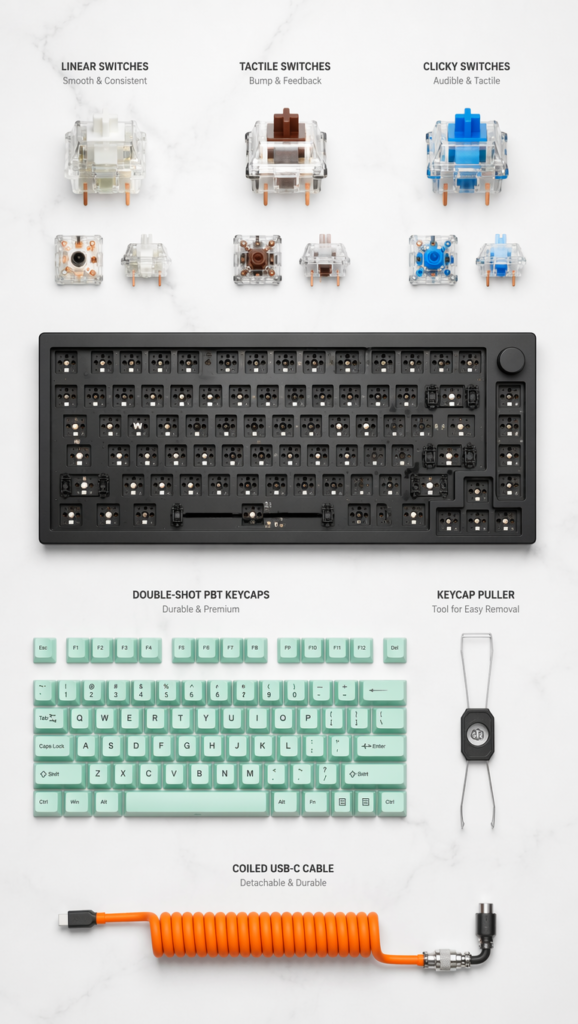
Linear switches offer a smooth, consistent press from top to bottom without any bump or click. They are very quiet and are generally preferred by gamers for their fast, uninterrupted keystrokes. Cherry MX Red is a popular example.
Tactile switches feature a noticeable bump midway through the key press. This bump provides physical feedback, letting you know the key has registered without needing to press all the way down. They are excellent for typing and are a great middle-ground option. Cherry MX Brown is a classic tactile switch.
Clicky switches are similar to tactile switches but with an added audible click sound. They provide both tactile and audio feedback, making typing feel very deliberate and satisfying. However, they can be quite loud, so they are best for home use. Cherry MX Blue is a well-known clicky switch.
Hot-Swappable Sockets
A hot-swappable keyboard allows you to change the switches without soldering. This is a valuable feature because it lets you experiment with different switch types and easily replace a faulty switch. It adds to the longevity of your keyboard.
Keyboard Sizes
Mechanical keyboards come in various sizes:
- Full-size (100%) includes a number pad. It is best for data entry and finance work.
- Tenkeyless (TKL or 80%) removes the number pad. It is more compact and better for gaming and desk space.
- 75% is a compact layout that keeps the function row and arrow keys. It is a popular modern choice for a clean setup.
- 60% is ultra-compact, removing the function row and arrow keys. It is ideal for minimalists and travel.
Build Quality and Keycaps
Look for a keyboard with a solid build. An aluminum or steel plate adds rigidity and a premium feel. Keycaps are also important. Double-shot PBT keycaps are more durable and resistant to shine than ABS keycaps.
Real-Life Benefits

Switching to a mechanical keyboard provides tangible benefits in daily life.
For programmers and writers, the tactile feedback can reduce typos and increase typing speed. The comfort of a mechanical switch can prevent repetitive strain injuries during long coding or writing sessions. The satisfying feel also makes the work more enjoyable.
For gamers, the precision and speed of mechanical switches, especially linear ones, can provide a competitive edge. The ability to register rapid, repeated keystrokes is crucial in fast-paced games.
For office workers, a quieter tactile or linear switch can provide a better typing experience without disturbing colleagues. The durability also means it is a long-term investment.
Step-by-Step Usage Guide
Setting up and using your mechanical keyboard is straightforward, but here is a step-by-step guide to ensure you get the most out of it.
Step 1: Unbox and inspect. Carefully remove your keyboard from the box. Check for any damage and ensure all components, like the keycap puller and USB cable, are present.
Step 2: Connect to your device. Plug the USB cable into your computer for a wired connection. For wireless keyboards, turn on the device and pair it via Bluetooth or the 2.4GHz receiver.
Step 3: Install any necessary software. Many gaming and premium keyboards come with software for customization. Download it from the manufacturer’s website. This software lets you remap keys, create macros, and customize RGB lighting.
Step 4: Adjust the keyboard feet. Most keyboards have adjustable feet on the bottom. Experiment with different angles to find the most comfortable typing position for your wrists.
Step 5: Test the switches. Type a few paragraphs or play a game to get a feel for the switches. Pay attention to the actuation point and the feedback.
Step 6: Customize your keycaps (optional). If you have a hot-swappable keyboard, you can remove the keycaps using a keycap puller and replace them with a different set for a new look or feel.
Step 7: Maintain your keyboard. Regularly clean your keyboard by using compressed air to remove dust. For a deeper clean, you can remove the keycaps and wipe down the board.
Best Product Recommendations
Here are some of the best mechanical keyboards for different needs and budgets in 2026.
1. Razer Pro Type Ultra (Best Overall Wireless)
The Razer Pro Type Ultra is an excellent choice for users who want a premium wireless mechanical keyboard. It features Razer Yellow switches, which are linear and quiet, providing a satisfying and smooth typing experience. Its comfortable wrist rest and sleek white design make it a standout. It is suitable for both work and play.
- Pros: Quiet linear switches, comfortable wrist rest, connects to multiple devices.
- Cons: Pricey, white color may show dirt easily, Windows-only sync.
2. Be Quiet Light Mount (Best Wired Keyboard)
If you want a premium wired keyboard, the Be Quiet Light Mount is a top contender. As the name suggests, it is exceptionally quiet thanks to its silent key switches and sound-damping material. It also features a volume knob and programmable macro keys, making it a versatile tool for both gamers and professionals.
- Pros: Very quiet, responsive switches, easy-to-use software.
- Cons: Wired only, design might not appeal to everyone.
3. Keychron C3 Pro (Best Budget)
For those on a tight budget, the Keychron C3 Pro offers incredible value. It provides a solid mechanical typing experience at an affordable price. It is a wired keyboard that is great for beginners who want to try a mechanical keyboard without a significant financial commitment.
- Pros: Very affordable, good build quality for the price, reliable.
- Cons: Wired only, basic features, fewer customization options.
4. Asus ROG Strix Scope II 96 Wireless (Best for Gaming)
Gamers should consider the Asus ROG Strix Scope II 96 Wireless. It offers a 96% layout, which saves desk space while retaining the number pad. It is designed for high-performance gaming with low-latency wireless connectivity. It is a solid choice for those who want a compact, feature-rich gaming keyboard.
- Pros: Compact 96% layout, low-latency wireless, great for gaming.
- Cons: May not be ideal for heavy typists, premium price.
Quick Comparison
| Product | Price Level | Key Feature + Best For |
|---|---|---|
| Razer Pro Type Ultra | High | Quiet linear switches + premium all-rounder for work and play |
| Be Quiet Light Mount | Mid-High | Ultra-silent build + ideal for quiet offices and gaming |
| Keychron C3 Pro | Low | Great value + perfect for beginners and budget buyers |
| Asus ROG Strix Scope II 96 | High | Compact 96% layout + best for competitive gamers |
Buying Guide (What to Check Before Purchase)
Before you buy your mechanical keyboard, consider these factors:
Switch type is the most important decision. Do you want a smooth linear switch for gaming, a tactile switch for typing, or a clicky switch for that classic mechanical sound? Your choice will define your entire experience.
Consider the keyboard size. Do you need a number pad? If not, a TKL or 75% keyboard will save desk space and bring your mouse closer, which is better for ergonomics.
Check for hot-swappable sockets. This feature allows you to change switches later, extending the life of your keyboard.
Think about connectivity. Wired keyboards offer the lowest latency. Wireless keyboards provide a cleaner desk setup but need charging.
Look at the keycaps. PBT keycaps are more durable than ABS. Double-shot legends will never fade.
Read About : 16 Cute Phone Cases Ideas to Make Your Phone Stand Out in 2026
Who Should Buy vs Who Should Avoid
A mechanical keyboard is a great investment for many, but it is not for everyone.
You should buy a mechanical keyboard if:
- You type for long hours and want to reduce fatigue.
- You are a gamer looking for a competitive edge.
- You want a durable keyboard that will last for years.
- You enjoy customizing your tech setup.
You should avoid a mechanical keyboard if:
- You are on a very tight budget (good mechanical keyboards cost more than standard ones).
- You need a completely silent keyboard for a shared office (though some linear switches are very quiet).
- You do not care about typing feel or performance and just want the cheapest option.
FAQ Section
What is the difference between a mechanical and a membrane keyboard?
A mechanical keyboard uses individual switches for each key, offering better feedback, durability, and performance. A membrane keyboard uses a single rubber dome layer, which feels mushy and is less durable.
Which switch type is best for typing?
Tactile switches like Cherry MX Brown are often considered best for typing because they provide a noticeable bump that confirms the keystroke. However, some people prefer linear switches for a smooth and quiet experience.
Are mechanical keyboards good for gaming?
Yes, mechanical keyboards are excellent for gaming. Linear switches are often preferred for their fast and smooth keystrokes, which can provide a competitive advantage.
What does hot-swappable mean?
Hot-swappable means you can change the switches on your keyboard without soldering. This allows you to easily customize the feel of your keyboard or replace a faulty switch.
Is a mechanical keyboard worth the money?
For most users, yes. The improved typing experience, durability, and customization options make a mechanical keyboard a worthwhile long-term investment.
Conclusion
Choosing the best mechanical keyboard comes down to understanding your personal needs. The switch type, keyboard size, and features like hot-swappability are the most critical factors to consider. Whether you are a gamer, a writer, or a professional, there is a mechanical keyboard out there that will perfectly suit your style.
The Razer Pro Type Ultra is an outstanding all-rounder for those who want a premium wireless experience. The Be Quiet Light Mount is perfect for a silent, high-quality wired setup. For gamers, the Asus ROG Strix Scope II 96 Wireless offers excellent performance. And for beginners, the Keychron C3 Pro is a fantastic starting point.
Investing in a mechanical keyboard is investing in your comfort and productivity. Take your time, consider your options, and enjoy the satisfying world of mechanical keyboards.

Haseeb Ur Rehman Lali is the lead technical author at TechDoAction, known for decoding the latest advancements in Artificial Intelligence and Software and Security Solutions for a global audience. His research-driven articles on AI frameworks and software solutions remain some of the site’s most trusted resources. He also leads Tech Gift Guides, applying the same research-first approach to help readers find gear worth packing or gifting. His mission stays the same: turn complex choices into clear, practical knowledge readers can use immediately.
