
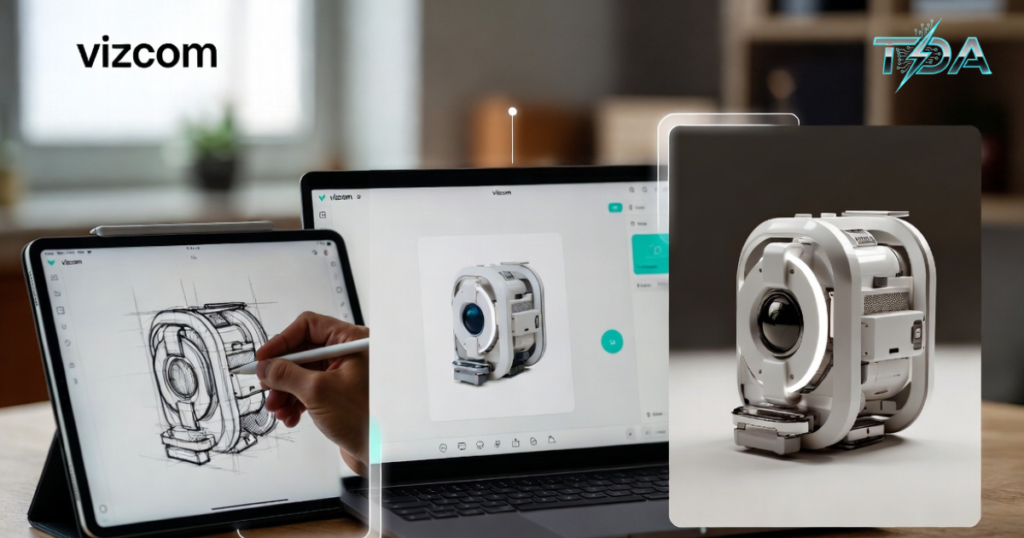
Vizcom is an innovative AI-powered platform built to help designers turn basic hand-drawn sketches into clean, realistic visuals and 3D-like models in just seconds. In simple terms, Vizcom takes your rough ideas on paper or screen and makes them look professional without any complicated steps or expensive software.
If you have ever struggled to show others what your design idea really looks like, then Vizcom changes everything. It feels like having a smart assistant right in your browser that understands exactly what you drew and brings it to life with great lighting, materials, and depth. Many creatives today use Vizcom because it saves hours of work and makes sharing ideas super easy.
Moreover, this tool fits perfectly into everyday design tasks. Whether you are working alone or with a team, Vizcom makes the whole process smoother and more fun. In this detailed article, you will discover everything about Vizcom, from how it started to real stories of people using it, plus a clear step-by-step guide so you can try it yourself. By the end, you will see why so many designers now trust Vizcom to boost their creativity and confidence.
The Story Behind Vizcom and Why It Matters Today
Vizcom launched in 2021 from a team in San Francisco who saw a big problem in design work. Designers often spend too much time turning rough sketches into something clients or bosses can understand. Traditional tools took days or weeks, but Vizcom flips that around completely.
For example, think about a young product designer named Sarah who works at a small startup. She had a brilliant idea for a new smartwatch, but her pencil sketch looked basic. She tried showing it to her team, yet everyone struggled to picture the final product. Then she discovered Vizcom. In minutes, her simple drawing became a shiny 3D visual with metal finishes and perfect shadows. Her team loved it, and the idea moved forward faster than ever. Stories like Sarah’s happen every day with Vizcom.
In addition, big companies are noticing the power of Vizcom too. General Motors started using Vizcom to speed up car design. What once took months of back-and-forth between sketches and full 3D models now happens in hours. Engineers upload a quick drawing, and Vizcom creates realistic views they can test right away. This kind of real-world success shows how Vizcom is not just another app — it actually changes how teams create.
Furthermore, Vizcom raised over $20 million from smart investors because people believe in its future. The company keeps improving the tool based on feedback from real designers. As a result, Vizcom stays focused on what matters most: helping you visualize ideas quickly and clearly.
How Vizcom Works: Simple Technology Made for Real Designers
At its heart, Vizcom uses smart AI to look at your sketch and understand shapes, lines, and ideas. It does not just guess — it reads the drawing like a human would and then adds realistic lighting, colors, and materials.
However, it is different from general image tools because it focuses only on design work. It keeps your original perspective and structure so the output feels real and useful. For instance, if you draw a chair, Vizcom knows it has legs and a seat, and it renders them with proper depth instead of making something weird or flat.
Moreover, you can tweak everything easily. Change the material from plastic to wood, adjust the lighting from bright daylight to soft evening glow, or try different colors — all with a few clicks. Vizcom even lets you work in layers so you can update one part without messing up the whole image.
Transitioning to another great part, it works right in your web browser. No need to download heavy programs or buy special computers. It also connects nicely with iPad and Apple Pencil, so you can sketch directly on your tablet and see results instantly. This flexibility makes Vizcom feel natural for busy creatives who move between desk and meetings.
Step-by-Step Guide: How to Start Using Vizcom Today

Getting started with Vizcom is straightforward and takes only a few minutes. Here is a clear step-by-step guide that anyone can follow, even if you are new to design tools.
Step 1: Visit the website and sign up for the free account. You do not need a credit card to begin, and the free tier gives you ten renders every month so you can test everything safely.
Step 2: Prepare your sketch. You can draw it by hand on paper and take a clear photo, or create it digitally on your iPad. Make sure the lines are dark enough for the AI to read well. Once ready, upload the image directly into the Vizcom canvas.
Step 3: Choose your style. It offers presets like photorealistic, clean sketch look, or watercolor style. Pick one that matches your goal. For product ideas, most people start with photorealistic to see how it might look in real life.
Step 4: Add details. Use the built-in tools to adjust colors, pick materials like metal or fabric, and set lighting direction. You can even write short notes like “make this part shiny,” and the AI listens. It processes everything quickly — often in under ten seconds.
Step 5: Review the result. If something needs fixing, simply draw over the image or add a new layer and regenerate just that part. This iteration process feels like a natural conversation with the tool.
Step 6: Collaborate or export. Share the canvas link with your team for real-time comments, or download the image in high quality. For advanced users, export in USDZ format so you can view your design in augmented reality on a phone.
By following these steps, you will go from rough idea to polished visual without stress. Many new users say the first time they try Vizcom, they feel amazed at how fast and accurate it is.
Key Features That Make Vizcom a Must-Have Tool

It comes packed with helpful features designed for real design work. One standout is real-time collaboration. Teams can jump into the same canvas at the same time, leave comments, and make changes together. This saves endless email threads and meetings.
Another strong point is AI-assisted 3D modeling. Even though Vizcom is not full CAD software, it creates the look of real 3D with smart shading and depth. You get photorealistic renders that look almost like professional photos.
In addition, advanced rendering options let you experiment with different looks instantly. Change backgrounds, add shadows, or try new textures without starting over.
Security matters too. It keeps your designs safe and private so you always own your work. Plus, the platform offers AR previews through USDZ files, which means you can place your product in a real room using your phone camera.
Furthermore, It supports multiple layers and easy file imports. You can bring in reference images or existing 3D elements and blend them smoothly.
All these features work together to make it feel like a complete studio in your browser. Designers report they finish concepts much faster and with better quality than before.
Also Read: Vidnoz AI Review 2026: The Easy AI Video Creator That Turns Ideas Into Professional Videos Fast
Who Benefits Most from Vizcom and Real-Life Anecdotes
Vizcom shines for industrial designers, UX teams, architects, product developers, and educators.
Take the story of Mike, an architect working on a new office building. His early sketches looked flat on paper, but with Vizcom, he turned them into realistic views showing materials and lighting. He presented to the client the next day and won the project because the visuals felt so real.
Similarly, hardware teams use Vizcom during brainstorming. One electronics company used it to explore ten different versions of a wireless earbud case in one afternoon. The team picked the best one quickly because everyone could see clear renders instead of guessing from lines.
Even educators love Vizcom. Design teachers use it to show students how ideas evolve from sketch to final look, making lessons more exciting and practical.
However, it is not just for big companies. Freelancers and small studios benefit hugely because the free tier lets them test ideas without spending money upfront.
The Real Benefits of Choosing Vizcom
Using Vizcom brings clear advantages that add up fast. First, you save massive time. What used to take days now takes minutes, so you can explore more creative options.
Second, your presentations look more professional. Clients and bosses respond better to polished visuals, which often leads to faster approvals and happier projects.
Third, it reduces mistakes early on. Seeing realistic renders helps you spot design problems before they become expensive fixes later.
Moreover, the collaborative side builds better teamwork. Everyone stays on the same page, and feedback flows naturally.
In addition, the AR export feature lets you show designs in real space, which impresses stakeholders and helps them imagine the product in use.
Overall, these benefits give you confidence that your ideas are strong and ready to move forward.
Vizcom Pricing: Simple Plans That Fit Every Budget
It offers fair pricing that starts free and grows with your needs. The free tier gives you ten renders per month, perfect for trying the tool and small personal projects.
When you are ready for more, the Pro plan starts at just $18 per month. It unlocks higher resolution, more renders, and removes watermarks so you can use images commercially.
For teams, the Studio plan at $49 per month adds advanced collaboration, shared workspaces, and extra support.
Many users say the value is excellent because you get professional results without buying expensive rendering software. You can start small and upgrade later when your projects grow. This flexible approach makes Vizcom affordable and smart for long-term use.
Pros and Cons of Vizcom – Honest Look

Like any tool, Vizcom has strengths and a few areas to note.
Pros:
- Extremely fast renders (often under 10 seconds)
- Excellent iPad and Apple Pencil support
- Strong free tier for testing
- Clean, modern interface
- Great for early-stage concept visualization
Cons:
- Needs Pro plan for commercial use
- Less precise with very complex multi-object scenes
- Some textures can appear overly smooth
Despite these small points, the pros far outweigh any cons for most designers. Vizcom continues to improve with regular updates, showing the team listens to users.
Ready to Transform Your Design Workflow?
If you create products, buildings, or any physical concepts, It can become your secret weapon for faster, better work. The combination of speed, quality, and ease makes it stand out in a crowded market.
Thousands of designers already rely on Vizcom to bring ideas to life quickly and impress clients. You can too. Start with the free account and see the difference yourself.
To begin your journey right now, head over to the official Vizcom website and sign up for free. Once you experience the magic of turning sketches into stunning visuals, you will wonder how you ever worked without it. Give it a try today — your next great design is waiting.
FAQ
What is Vizcom exactly?
It is a web-based AI tool that turns hand sketches into photorealistic renders and 3D-like visuals in seconds.
How much does Vizcom cost?
It offers a free tier with 10 renders per month. Pro starts at $18/month and Studio at $49/month for teams.
Does Vizcom work on iPad?
Yes, it works great with Apple Pencil for direct sketching and instant rendering.
Can teams use Vizcom together?
Absolutely. Real-time collaboration lets everyone work on the same canvas at once.
Is Vizcom good for commercial projects?
Yes, especially on paid plans which allow commercial use and remove limits.
Final Thoughts
Vizcom stands as a smart, reliable choice for any designer who wants to move ideas forward quickly and confidently. From the first sketch to the final shareable visual, it makes the entire process smoother, faster, and more enjoyable. With its powerful AI, simple workflow, and flexible pricing, Vizcom helps you create better work without the usual headaches.
Do not wait to see what your ideas can become. Try today and join the growing group of creatives who now design with speed and style. Your next breakthrough project could start with one simple upload. Go ahead — open it and watch your sketches come alive like never before. You will be glad you did.

Haseeb Ur Rehman Lali is the lead technical author at TechDoAction, known for decoding the latest advancements in Artificial Intelligence and Software and Security Solutions for a global audience. His research-driven articles on AI frameworks and software solutions remain some of the site’s most trusted resources. He also leads Tech Gift Guides, applying the same research-first approach to help readers find gear worth packing or gifting. His mission stays the same: turn complex choices into clear, practical knowledge readers can use immediately.
